Dark mode

As of Dradis v5.0, you can set your UI to dark mode, light mode, or auto mode (uses your system preferences). You will have this button in the top right of your UI:
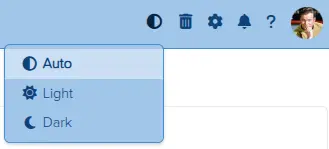
Screenshot of the Dradis dark mode button

Pick your preference of light, dark, or auto mode.

Seven Strategies To Differentiate Your Cybersecurity Consultancy

You don’t need to reinvent the wheel to stand out from other cybersecurity consultancies. Often, it's about doing the simple things better, and clearly communicating what sets you apart.

  • Tell your story better
  • Improve your testimonials and case studies
  • Build strategic partnerships

Your email is kept private. We don't do the spam thing.