Category Archives: Security Practice

Posts in this category are about general topics on running a security team (either internal or external)

Claude audited Dradis, then used Dradis to report the findings

This is the story of how the Dradis 5.0 release we’d been working on for months got delayed by 48 hours, thanks to Claude. Dradis is a self-hosted pentest reporting and collaboration platform used by cybersecurity teams around the world.
On April 14, 2026, OpenAI announced GPT-5.4-Cyber, a variant of GPT-5 tuned for cybersecurity work. The same day, Dradis 5.0 was scheduled to ship. A week before GPT-5.4-Cyber, Anthropic had announced Mythos Preview, claiming Claude could now identify and exploit zero-day vulnerabilities in every major operating system and web browser.

Two weeks before that, Thomas Ptacek (tptacek) published “Vulnerability research is cooked”, profiling how Nicholas Carlini at Anthropic’s Frontier Red Team runs Claude across every file in a codebase and asks it to find bugs.

Three announcements, sixteen days. Reading them while our next major release sat green and ready to push, the answer was obvious. It would be irresponsible to ship 5.0 without running the same kind of audit on our own code. Forty-eight hours later, eight findings had been triaged and fixed, and 5.0 went out the door.
Key Takeaways

  • Between March 30 and April 14, 2026, three major AI security announcements changed what a reasonable engineering team should try on its own code before a release.
  • We held Dradis 5.0 for 48 hours to run an AI-assisted security audit on the codebase. Eight findings surfaced. Every finding was triaged, fixed, and merged before the release shipped.
  • The brute-force “Claude on every file” approach that Carlini uses is viable but expensive. Building an architectural primer once, then running per-file audits warm, produced sharper findings at a fraction of the cost.
  • We tracked the audit using Dradis itself, organized against the OWASP Top 10 2025 methodology and templates shipped in 5.0. The reporting tool reported on its own vulnerabilities.
  • The 48-hour turnaround was possible because Dradis already runs an AI-assisted code review pipeline as part of the standard PR workflow. Without that infrastructure already in place, the audit would have taken longer or shipped rougher.
  • We can publish the audit this transparently because the Dradis code is self-hosted and open-source, and you can inspect and extend Dradis. You may be interested in the fixes in dradis/dradis-ce PRs.

This applies if

  • You ship a product that handles sensitive data and want to understand what an AI-assisted security audit looks like in practice, not in a vendor pitch.
  • You are evaluating Dradis (or any security platform) for a regulated environment and want to see how the team behind it operates when the stakes are real.
  • You run your own codebase and want to replicate the primer-first audit pattern described here. The practical steps section at the end is sized for that.

Skip this if

  • You are looking for a general introduction to AI in cybersecurity. This is a specific case study about a specific audit on a specific codebase in a specific 48-hour window.
  • You want a comparison of AI coding assistants. We used Claude because it was the tool that fit. The pattern works with other frontier models.

The three announcements that made this inevitable

On March 30, Ptacek’s piece introduced a lot of people to the Carlini method. It’s disarmingly simple. Download a code repository. Write a bash script. Inside the loop, run the same Claude Code prompt against every source file:

“Find me an exploitable vulnerability in this project. Start with ${FILE}.”

Ptacek compares it to “a kid in the back seat of a car on a long drive, asking ‘are we there yet?'” The stochasticity is a feature. Each invocation is a slightly different attempt at the same question, and the diffs across runs find things single-shot audits miss.

A week later, Anthropic announced Mythos Preview. The headline claim was that Claude can now identify and exploit zero-days in every major operating system and every major web browser when directed to do so. The Mythos post included the detail that non-experts have used the model to produce working exploits overnight. That one sat with us for a few days.

Then GPT-5.4-Cyber landed on April 14, the same day our 5.0 release branch was green and ready to push. OpenAI’s announcement framed it as a defensive model with lowered refusal boundaries for legitimate security work. Reverse engineering, vulnerability analysis, malware analysis. Access gated behind the Trusted Access for Cyber program.

Three announcements in sixteen days. We serve the security industry. Our customers use Dradis to hold their most sensitive client data. We ship a major release the same week two of the largest AI labs release models purpose-built for offensive security work. Reading those announcements while the release sat ready, the question answered itself. Not shipping without trying this on our own code first was the only defensible position.

The brute-force approach, and why we didn’t use it

The first instinct was the Carlini method exactly. Bash loop. Every file. Claude Code with the vuln-finding prompt. The Pro codebase narrowed to roughly 660 Ruby files in the audit surface. Routed controllers, models, jobs, libs touching user input. We did the math on Opus pricing against that file count and came out around $1,000 to $1,600 for a single pass. On Sonnet, $200 to $330. Wall-clock hours per pass, much of it re-discovering the same architecture in every cold invocation.

The cost was not the deal-breaker. The time was. We had 48 hours to run the audit and ship, not 48 hours of compute budget. And more importantly, the quality signal was wrong. Every file-scan spent most of its token budget re-learning what authentication looked like in our codebase, where current_project came from, how the CanCanCan ability model routed authorization. Each call arrived at the file cold, rediscovered the scaffolding, then had a few thousand tokens left to reason about the actual file.

So we changed the shape.

The Primer pivot

Instead of 660 cold starts, one warm one. A single Opus session read the routes, the controller hierarchy, the four Warden strategies, the CanCan ability model, the API base controllers, the Personal Access Token scope-enforcement logic, and the project-scoping concerns. That session produced THREAT_PRIMER.md, an architectural orientation document. Its opening paragraph sets the frame for everything after it:

You are auditing the Dradis Pro Rails app for exploitable vulnerabilities. This primer summarizes the auth, authorization, and request-flow scaffolding so you don’t have to rediscover it for every file. Read this first, then focus your investigation on the specific file you were given.

The primer runs about 2,000 tokens. Authentication chains. Authorization model. Sensitive sinks (file uploads, Liquid templates, mass assignment, jobs that deserialize user input). A section called “Patterns that look scary but are intentional“, so the audit wouldn’t waste time re-flagging design decisions like returning 404 instead of 403 on authorization failures as info-hiding.

This is what the primer bought us: subsequent per-file audits started warm. Every scan got the primer in context before it saw the file. Same coverage as Carlini’s approach, sharper findings because each pass arrived knowing the architecture, dramatically lower cost because the structural learning happened once instead of 660 times.

That pivot alone took the work from “not doable in 48 hours” to “doable in 48 hours, with time left for fixes.”

The eight findings

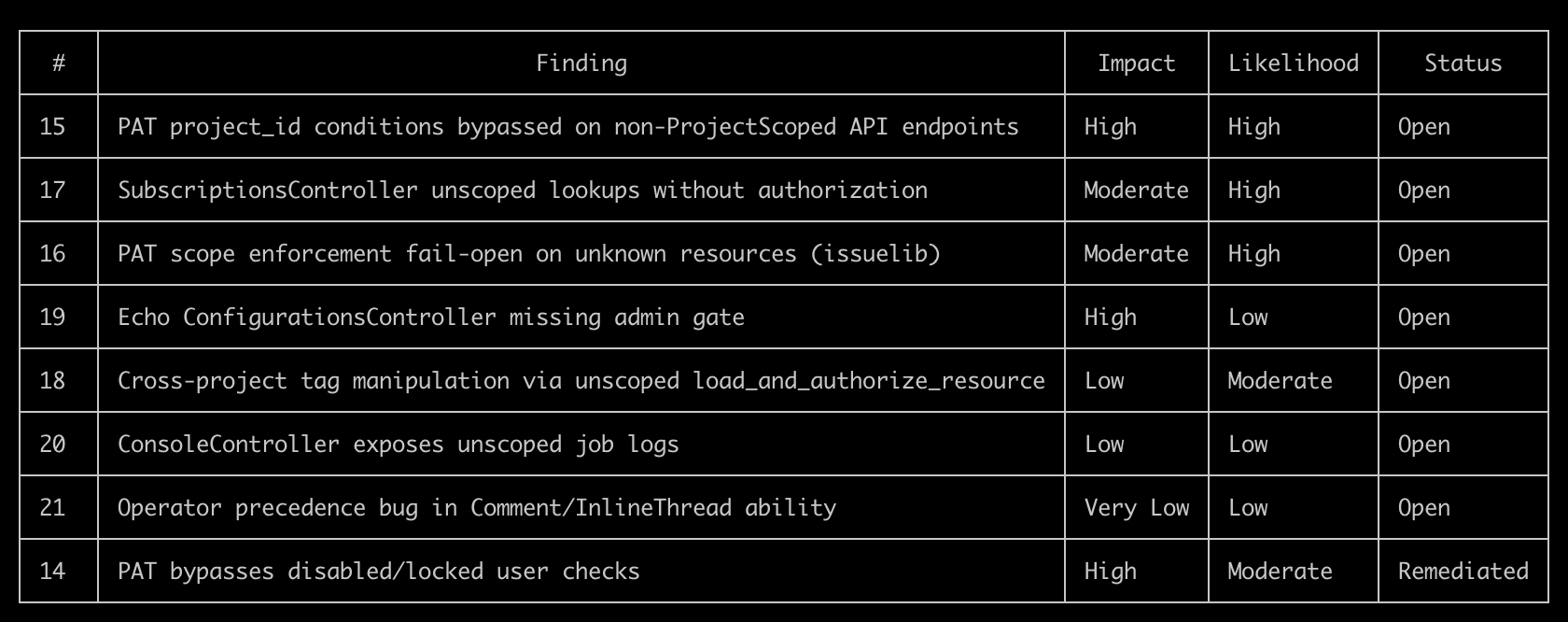
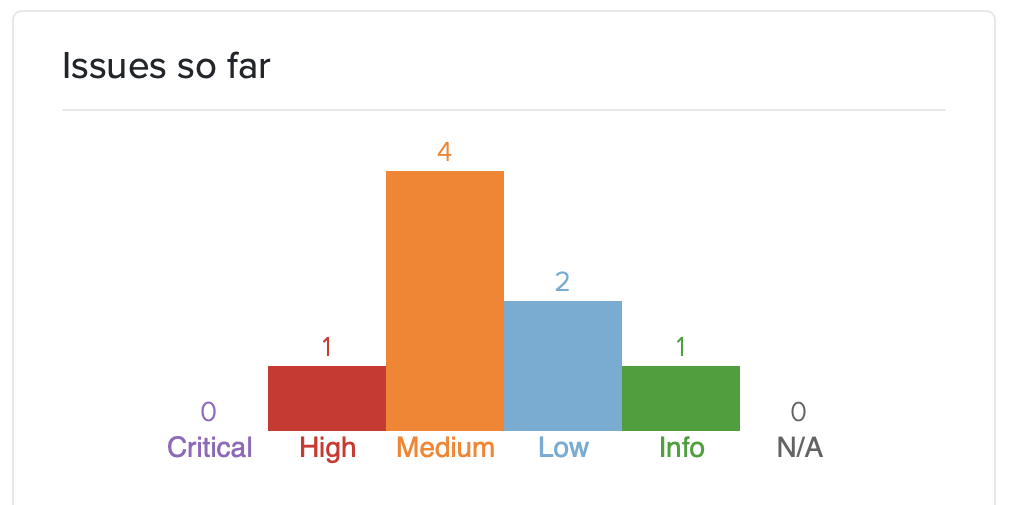
The audit surfaced eight issues. Severities spread from CVSS High down to Info. Click for more details:
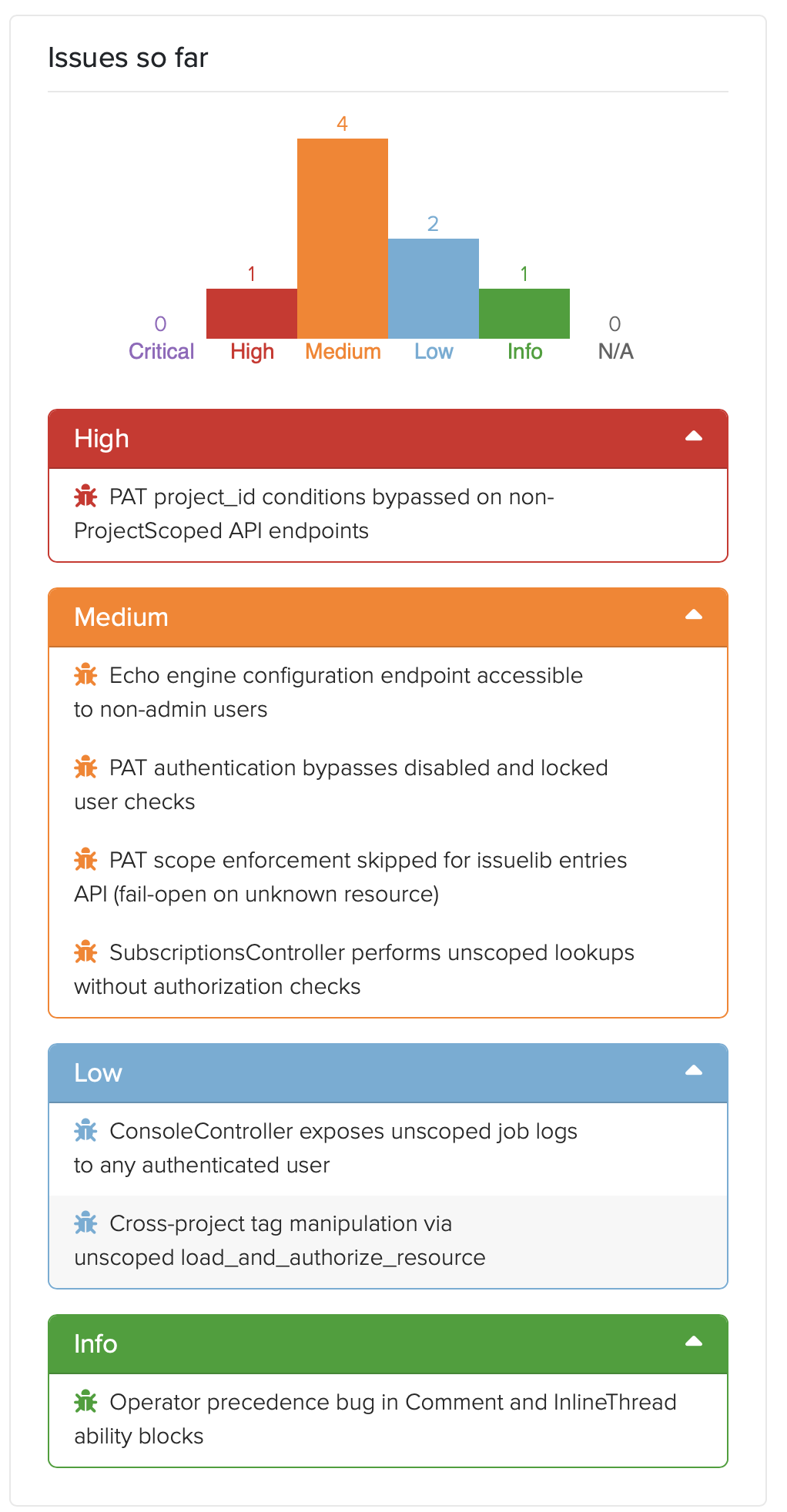
  1. Personal Access Token authentication didn’t check whether the authenticating user was disabled or locked. Every other Warden strategy in the codebase did. The new PAT strategy, shipping for the first time in 5.0, didn’t. Fixed pre-release.
  2. PAT project_id conditions could be bypassed on the direct /api/projects endpoints. The condition system expects a Dradis-Project-Id header; the direct-projects controller reads the project from URL params. A PAT restricted to “project 2 only” could read project 1 by omitting the header. Fixed pre-release.
  3. PAT scope enforcement failed open when a controller’s resource name wasn’t in the allowed list. A new engine forgetting to register its resources would silently grant full access. Flipped to fail-closed. Fixed pre-release.
  4. SubscriptionsController had no authorization checks. Any authenticated user could subscribe to, or enumerate subscribers of, any resource across any project. A real shipped vulnerability in both CE and Pro. The CE-side fix is public at dradis-ce#1563 and the vuln report in our Security Reports page.
  5. Cross-project tag manipulation through an unscoped load_and_authorize_resource. Pro-specific vuln; the controller-shape fix went to CE too for code parity (dradis-ce#1563 covers the refactor that landed alongside the subscriptions fix).
  6. Echo configuration UI was accessible to non-admin users in Pro deployments. Dradis Echo shipped in 4.19 as a separate addon. Dradis 5.0 takes it out of Beta and includes it in the main framework, so this never reached a public version. The admin gate landed pre-release at dradis-ce#1565.
  7. Console job logs not scoped per user. After investigation, accepted as a capability-token design: the job UUID is server-generated via SecureRandom.uuid, 122 bits of entropy, only returned to the initiating user and short-lived. The documentation landed at dradis-ce#1564 so the design intent is recorded in the code where the next person looking at it will see it.
  8. A latent operator-precedence bug in the Comment and InlineThread CanCan ability blocks. Not exploitable under shipped ability rules. Still fixed defensively, because the next engine that adds a can :read ability on a commentable type would have silently opened a hole.

The full public advisories are on the Dradis Security Reports page. CHANGELOG entries are dated and in the 5.0.0 release notes.

Dradis tracking the Dradis audit

Granting Access

It was a great opportunity to test-drive our new Personal Access Token feature that allows user to create restricted access tokens for integrations or tools. We gave full Project access:
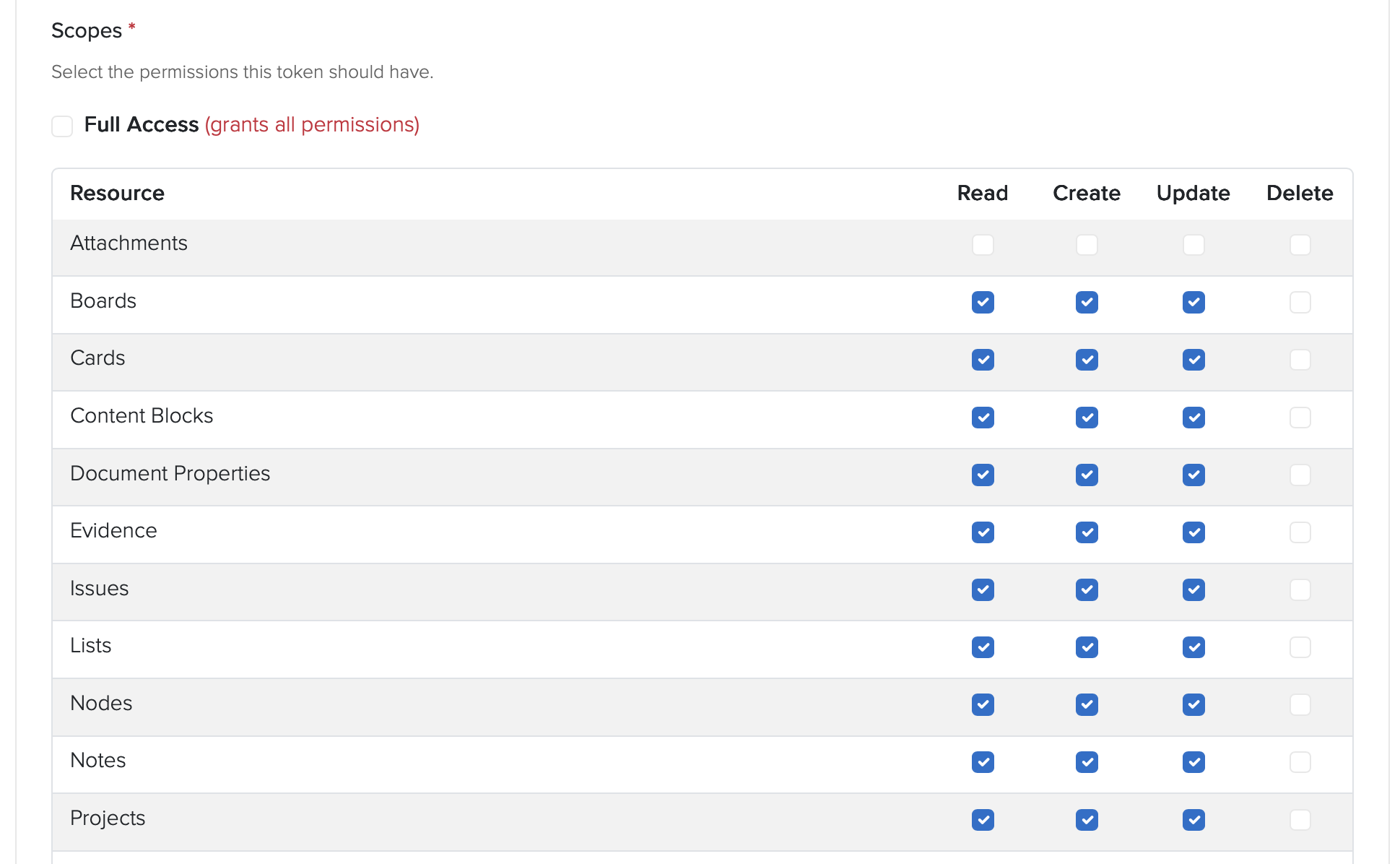
And then narrowed down to a single Project:

And set a 30 day expiration:

Gave the generated PAT to Claude and asked it to test access:

⏺ Good — API works, issue created. Let me delete that test issue and start the real audit.

Choosing the schema

Every finding went into a Dradis project, we chose the OWASP Top 10:2025, schema which we vibe-coded about a month ago (see dradis/dradis-claude for the SKILL files):
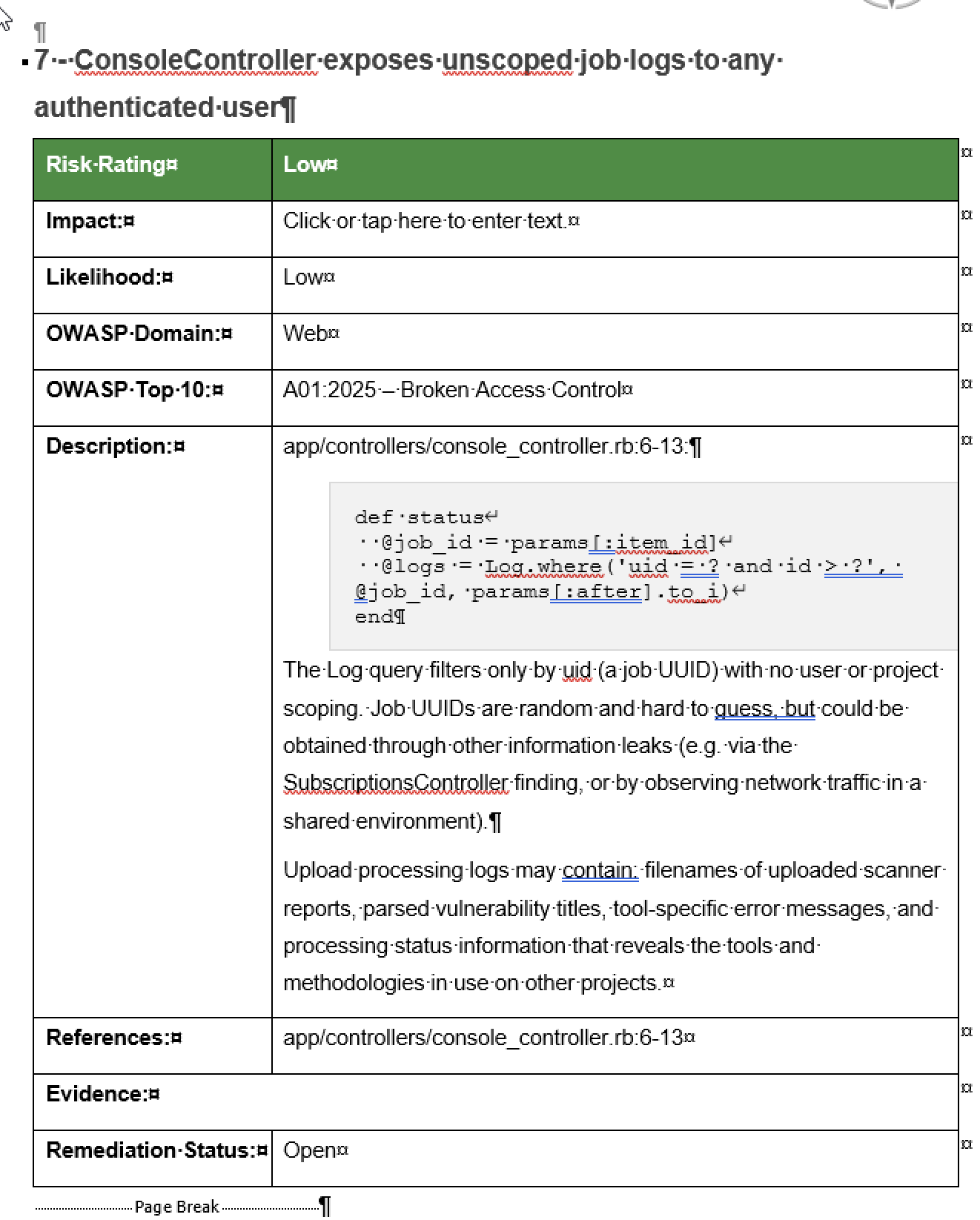
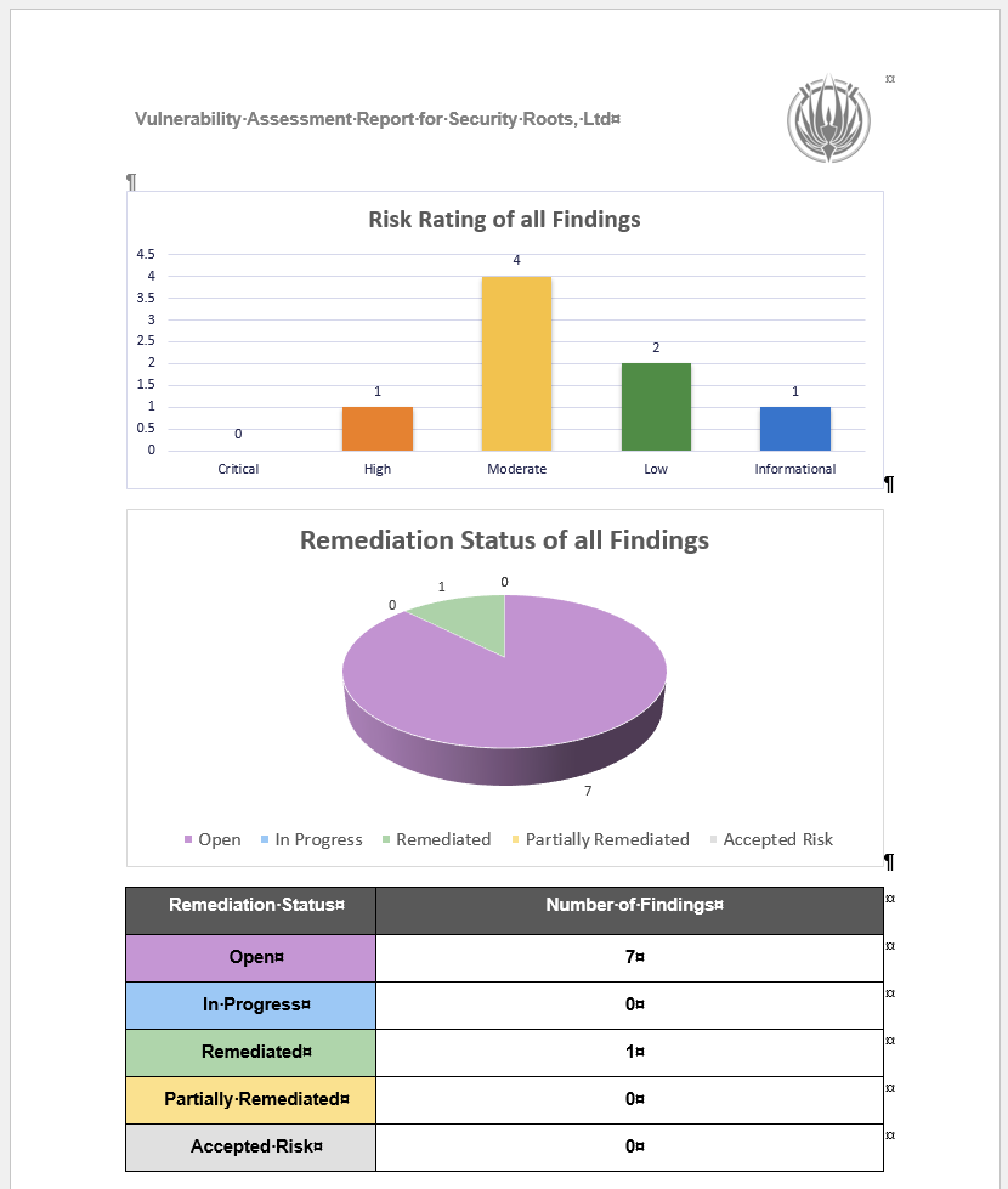
This is the part that still feels absurd when you say it out loud. The OWASP Top 10 2025 kit we were about to ship in Dradis 5.0, the methodology, the sample project, and the three report templates, were used to run and document the audit on the codebase that was about to ship them. The reporting tool reported on its own vulnerabilities, using its own brand-new methodology content, while the release that introduced that content waited for the audit to finish.
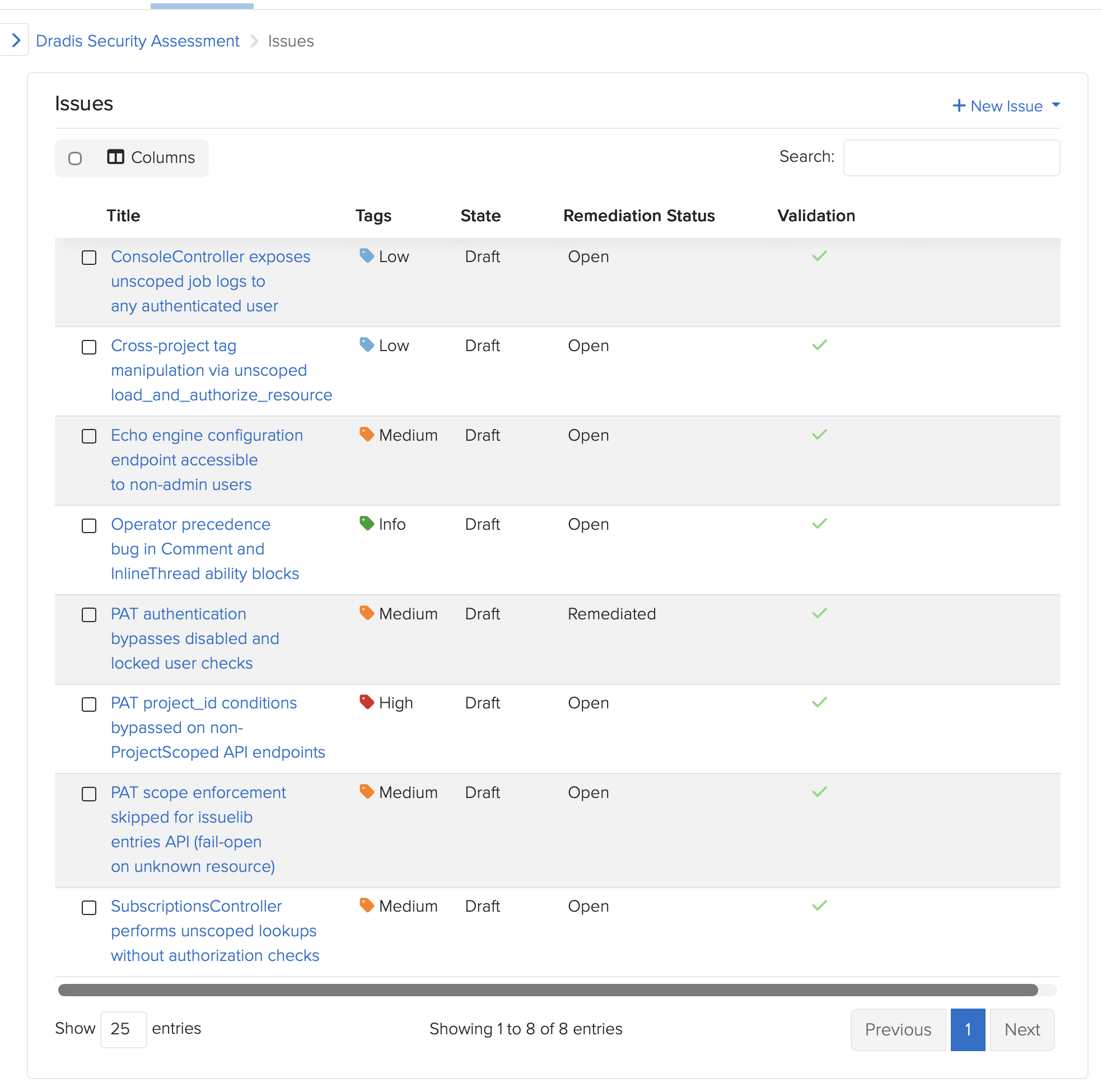
Dogfooding is a cliche. This was the literal form of it. If the kit doesn’t work for organizing an eight-finding audit under time pressure, we don’t ship the kit. The kit worked. The findings are in Dradis. The Dradis findings were used to drive the Dradis fixes. The fixes shipped in Dradis 5.0 alongside the kit.
“You got lucky”

AI-assisted security work has a known failure mode. Models assert things with absolute confidence, including things they have not actually verified. Experienced operators learn to hear the tone and push back before an assertion becomes a design decision.

One concrete example from this audit: While fixing the cross-project tag manipulation issue, Claude asserted that a particular CanCan ability tightening could not be ported from Pro to CE because of a framework limitation. The reasoning sounded plausible. It was plausible. But the reviewer had seen this pattern often enough to flag it.

“Unless you confirm this as a limitation with CanCan, I don’t buy your argument.”

The assertion got tested. It was correct. The exact error, from CanCan’s internal accessible_by when building SQL for an association that doesn’t exist in one of the two repos: NoMethodError: undefined method 'klass' for nil. Real limitation. The fix landed.

The reviewer’s response: “You got lucky.”

That is an important moment in AI-assisted engineering. Not when the model produces output, but when the operator decides whether to trust it.

The model had produced a confident, specific, mechanically-plausible claim, and it happened to be right. It also could have been wrong, and if it had been, we would have shipped a broken CE refactor and a misleading commit message explaining why.

The lesson is not “AI is unreliable.” The lesson is that AI-assisted engineering without an experienced operator calling bluffs on overconfident output is not engineering. It is rolling dice on production code. The same discipline applies whether the output is a bug report, a fix proposal, or an architectural justification.

Trust, then verify. Every single time.

The AI-assisted code review pipeline is why this fit in 48 hours

The 48-hour turnaround was not possible because of Claude alone. It was possible because Dradis already runs an AI-assisted code review pipeline as part of the standard PR workflow. That pipeline reviewed the audit’s own fixes.

One of the PRs in the audit received an automated review from a separate agent. The review flagged a real edge case in the fix: an empty allowlist in a personal access token’s project conditions passed the present? check as false, so the token’s index endpoint still worked, while every member action returned 403. Incoherent behavior. The review caught it, the fix was tightened to use Hash#key? instead of present?, two regression tests were added, 27 examples continued to pass, and the PR merged cleaner than it started.

That review happened on an audit fix, by an AI agent reviewing AI-drafted code, and it caught a real bug.

This is what enabled the 48-hour window. The audit found eight things. The fixes needed to be reviewed in the same window. A team relying only on human reviewers to triage eight security PRs in two days produces either careful work or fast work. Not both. The AI-assisted review pipeline, already running against every PR on this codebase, turned “fast enough to ship on time” and “careful enough to ship safely” from competing constraints into complementary ones.

Ongoing AI-assisted audits are now part of our release pipeline. The 48-hour window was a one-time event driven by news. The audit pattern it used is now continuous, running against new code as it goes in, in the same pipeline that already checks everything else.

What this means, and what it doesn’t

What this means is not that AI replaces security engineers. The audit identified eight findings. A human with 20 hours of focused attention on the same codebase would have identified findings too. Possibly a different eight. Possibly overlapping. What AI-assisted audits change is the frequency and breadth. You can do this more often, across more surface area, with cost low enough that it becomes continuous rather than event-driven.

What it doesn’t mean is that the data is safe to send anywhere. This audit ran against a Rails codebase on engineer laptops. The prompts contained code, and the code contained architectural details of a commercial platform. Had this been a customer’s code, under NDA, the same prompts would have been a meaningful data exposure. We’ve covered the use of “Shadow AI” in pentesting before. It is also why Dradis Echo exists: local Ollama, no external API calls, scoped permissions. AI-assisted work on data that cannot leave your environment requires AI that runs inside your environment.

And what it especially does not mean is that your security platform should pretend to not need audits. Every security tool will be audited eventually. The question is whether the vendor audits first or a customer does. The week the two largest AI labs released models purpose-built for offensive security work is the week every security tool vendor should have run one of those models against their own code. That we did, in 48 hours, using our own product to track the work. We see it as the baseline a serious tool should meet.

Evaluating Dradis for a regulated environment? The audit is proof of one thing: the code is inspectable, the fixes are public, and the team that writes it will tell you when they find a bug in it. If that matches your procurement criteria, book a demo and we’ll walk through the deployment and audit approach with your team.

Practical next steps if you want to do this on your own code

If you want to run a version of this audit on your codebase, not every piece requires the same tooling we used. The shape generalizes.

  1. Build the primer first. One warm session with a frontier model, focused on architecture. Authentication, authorization, request-flow scaffolding, known-intentional patterns. Stop there. Commit the artifact. Every downstream scan reads it.
  2. Narrow the file list to the audit surface. Routed entry points, jobs that consume user input, serialization boundaries. Not templates, not schema files, not vendored dependencies.
  3. Use a cheaper model for the per-file pass, a stronger one for the primer. The primer is a one-time structural read. The per-file scans are stochastic pattern-matching against the primer’s context.
  4. Track every candidate finding in a reporting tool. Title, affected paths, reproduction, severity. If you use Dradis, we open-sourced the OWASP Top 10 2025 kit that shipped in 5.0 has a methodology and templates sized for this shape of work. If you don’t, any structured tracker works. The point is that findings stay in a system where they get triaged, not a chat log.
  5. Have an operator who will push back on confident-sounding claims. Every asserted framework limitation, every claimed impossibility, every “this can’t be done because,” gets verified. Every single one. That is the job.
  6. Wire the audit into the ongoing pipeline, not an annual event. The 48-hour turnaround was a news-driven intensity burst. The steady-state version is AI-assisted review against every PR, against every new entry point, continuously. That is what catches the next finding before it ships.

FAQ

Did Claude find everything?

No. That’s not the right question. The question is whether AI-assisted audits find things humans miss and vice versa. This audit surfaced eight findings. A human with the same time budget would have found some overlap and some gaps. The value of AI-assisted auditing is breadth and frequency, not replacement.

What model did you use?

A single Opus session produced the primer. The per-file scans used a mix of Opus and Sonnet depending on file size and suspected complexity. Total spend for the audit was well under a single engineer-day of time at equivalent billable rates.

Why publish this? Doesn’t it invite attackers?

Two reasons. First, the fixes shipped before this post did. The findings described here are closed. Second, a serious security posture is not a secret. Customers evaluating Dradis for regulated environments ask specifically for evidence of how we operate internally. Posts like this are the evidence (but of course, there’s more evidence from industry 3rd parties). A vendor who won’t tell you how they audit their own code is a vendor asking you to trust them without proof.

Is Dradis audited by third parties?

Yes. This post describes an internal AI-assisted audit specific to the 5.0 release. It is not a substitute for third-party penetration testing or code audit. Our customers cannot avoid running their own audits on the code they self-host. It’s in their nature 😂

Can I use Echo for this kind of work?

Echo is designed for report-writing assistance (finding descriptions, remediation language, CVSS scoring), not for code audit… yet. The architecture (local Ollama, no external API, scoped permissions) is the same principle, but the model sizes and prompt patterns are different. We used Claude Code and Codex for code audits specifically.

What about the findings that were accepted rather than fixed?

Finding 7 (console logs not scoped per user) was accepted as capability-token design after analysis. The reasoning is documented in the code itself at dradis-ce#1564. The summary: the job UUID is server-generated, random, only returned to the initiating user, and treated as the read capability for the associated logs. Adding row-level scoping would have required a migration and threading user context through 25+ call sites across core and every upload plugin. The cost was not proportionate to the residual risk, and the design intent is now recorded, where a future maintainer will see it. These logs are also garbage-collected daily.

What we learned that will change how we ship

Three things, all of them boring.

First: the primer-first pattern beats brute force on cost, speed, and output quality. We will use it again, and we will recommend it to teams asking us how we did this.

Second: AI-assisted security code review as a continuous pipeline (not an event) is the thing that made the 48-hour window possible. We had already been running one for general coding, now we’ve added the security review flavour. Teams that want the 48-hour capability need to build theirs before the news arrives, not after.

Third: the OWASP Top 10 2025 kit that shipped in 5.0 (methodology, sample project, three report templates) was battle-tested on an actual eight-finding audit under time pressure before it reached a single customer. That’s a better confidence signal than any launch blog could have delivered.

See how Dradis handles this in practice The audit turnaround, the OWASP 2025 kit, and the AI-assisted review pipeline are all part of Dradis 5.0. The code is self-hosted, the core is open-source, and the security fixes from this audit are in public CE PRs you can read.
If you’re evaluating platforms for a regulated environment, book a demo and we’ll walk through the deployment architecture and what this kind of audit looks like against your own team’s code. If you’re here for the AI-security angle and want to see how local AI fits into a pentest workflow, that’s the Echo page. Self-hosted, Ollama, no external API.

Writing a security report: the elements of a useful pentest deliverable

We have discussed that the security report produced at the end of the engagement is a key component in proving your worth to your current and future clients.

When crafting a pentest report not only you’ll have to think about what to include in the report (sections, contents, tables, stats) but you will also need to decide how to write it. Let’s review what it takes to create a useful pentest report.

We are not talking about the specifics or the differences in structure between the deliverable produced for different project types (e.g. VA vs. wifi vs. external infrastructure). We want to provide you with the high-level guiding principles that you can use to ensure that the final security report you produce and deliver to your clients is a useful one.

The recommendations in this piece are based on dozens of report templates that we’ve seen as part of our report customisation service for Dradis Pro as well as our experience in the industry.

The goal of the engagement

The security report produced after each engagement should have a clear goal. In turn, this goal needs to be aligned with the client’s high-level goals. In “Choosing an independent penetration testing firm” we saw how identifying the goals and requirements of an engagement is a real pain point for some clients but also an opportunity for the security firm to provide education and guidance to strengthen the partnership with their customers.

A typical goal as stated by the client could be: “our objective is to secure the information”. This can be a good starting point albeit somewhat naive in all except the most simple cases. These days systems are so complex that assessing the full environment is sometimes not realistically possible (due to time on budget constraints). A more concrete goal such as “make sure that traveller A can’t modify the itinerary or get access to traveler B’s information” would normally produce a better outcome.

However, for the sake of this post, let’s keep it simple and focus on the broader goal of “securing the information”. With that in mind, the goal of the security report needs to be to communicate the results of the test and provide the client with actionable advice they can use to achieve that goal. That’s right, we need to persuade our clients to act upon the results we provide them.

In order to help your client to meet their goals, the more you know about them and their internal structures and processes the better. Who commissioned the engagement? Why? Is there a hidden agenda? Familiarising yourself with their industry and domain-specific problems will also help to focus your efforts on the right places.

Finally, it is important to know the audience of the deliverable you are producing. This seems like an obvious statement, but there is more to it than meets the eye. Who do you think is going to be reading the report your firm has produced? Is this going to be limited to the developers building the solution (or the IT team managing the servers)? Unlikely. At the very least the development manager or the project lead for the environment will want to review the results. Depending on the size of the company, this person may not be as technical as the guys getting their hands dirty building the system. And maybe this person’s boss or their boss’ boss will be involved. If your results expose a risk that is big enough for the organisation, the report can go up the ladder, to the CSO, CTO or CEO.

One security report, multiple audiences

At the very least it is clear that we could have multiple audiences with different technical profiles taking an interest in your report. If there is a chance that your deliverable will end up making the rounds internally (and the truth is that this is always a possibility), the wrong approach to take is to either produce a completely technical document full of nitty-gritty details or, going to the other end of the spectrum, delivering a high-level overview with the summary of the highlights of the test apt for consumption by C-level execs but lacking on technical depth.

The easiest way to find the middle ground and provide a useful document for both the technically inclined and also to the business types among your readers is to clearly split the document into sections. Make these sections as independent and self-contained as possible. I like to imagine that different people in the audience will open the document and delete the section they are not interested in and they will still get their money’s worth of value on what remains.

Problems you don’t want to deal with

Before delving into what to include and how to structure it, there are two problems you don’t want to deal with during the reporting phase of the project: collation and coverage.

Collation

It is still quite common that a sizable amount of the reporting time allocated during a test is spent collating results from different team members.

As we saw in the “Why being on the same page matters?” post, there are steps you can take to minimise the amount of collation work needed such as the use of a collaboration tool during the engagement.

Reporting time shouldn’t be collation time. All information must be available to the report writer before the reporting time begins. And it must be available in a format that can be directly used in the report. If your processes currently don’t make this possible, please consider reviewing them as the benefits of having all the information promptly available to the report writer definitely outweigh the drawbacks involved in updating those processes.

Coverage

How good was the coverage attained during the testing phase of the engagement? Was no stone left unturned? Do you have both evidence of the issues you uncovered and proof of the areas that were tested but were implemented securely and thus didn’t yield any findings? If not, the task of writing the final report is going to be a challenging one.

We have already discussed how using testing methodologies can improve your consistency and maximise your coverage raising the quality bar across your projects. Following a standard methodology will ensure that you’d have gathered all the evidence you need to provide a solid picture of your work in the final deliverable. Otherwise, the temptation of going down the rabbit hole, chasing a bug that may or may not be there may become too strong. We’ve all been there, and there is nothing wrong with it, as long as it doesn’t consume too much time and enough time is left to cover all the areas of the assignment. If you fail to balance your efforts across the attack surface, this will be reflected in the report (i.e. you won’t be able to discuss the areas you didn’t cover) and it will reflect badly on your and your firms’ ability to meet your client’s expectations.

Security report sections

For the rest of this post, we will assume that you have been using a collaboration tool and are following a testing methodology during the testing phase and as a result, you’ve got all the results you need and have attained full coverage of the items under the scope of the engagement.

The goal of this post is not to provide a blow-by-blow breakdown of all the possible sections and structure you need to provide, there are some comprehensive resources on the net that go beyond what we could accomplish here (see Reporting – PTES or Writing a Penetration Testing Report). We want to focus on the overall structure and the reasons behind it as well as the approach and philosophy to follow when crafting the report to ensure you are producing a useful deliverable. At a very high level, the report content must be split between:

  • Executive summary
  • Technical details
  • Appendices

Executive summary

This is the most important section of the report and it is important not to kid ourselves into thinking otherwise. The project was commissioned not because an inherent desire to produce a technically secure environment but because there was a business need driving it. Call it risk management or strategy or marketing, it doesn’t matter. The business decided that a security review was necessary and our duty is to provide the business with a valuable summary.

The exec summary is probably the section that will be read by every single person going through the report, it is important to keep that in mind and to make sure that it is worded in a language that doesn’t require a lot of technical expertise to understand. Avoid talking about specific vulnerabilities (e.g. don’t mention cross-site request forgery) and focus on the impact these vulnerabilities have on the environment or its users. The fact that they are vulnerable to X is meaningless unless you also answer the question “so what?” and explain why they should care, why it is a bad thing and why they should be looking into mitigating the issue. As Guila says in the article, why give a presentation at all if you are not attempting to change the audience’s behaviors or attitudes?. And the security report is most definitely a presentation of your results to your client.

Don’t settle for just throwing in a bunch of low-end issues to the conclusions (e.g. “HTTPs content cached” or “ICMP timestamps enabled”) just to show that you uncovered something. If the environment was relatively secure and only low-impact findings were identified, just say so, your client will appreciate it.

Frame the discussion around the integrity, confidentiality, and availability of data stored, processed and transmitted by the application. Just covering the combination of these 6 concepts should give you more than enough content to create a decent summary (protip: meet the McCumber cube).

Apart from the project’s conclusions and recommendations, it is important that this section contains information about the scope of the test and that it highlights any caveats that arose during the engagement. Again this is to correctly frame the discussion and give the readers that may not be as familiar with the particular environment (e.g. CSO) the appropriate context.

In addition, it offers you protection should the client decide to challenge your results, approach or coverage attained. If a host or a given type of attack was requested by the client to be out of scope, this needs to be clearly stated. Along the same lines, if there were important issues affecting the delivery (e.g. the environment was offline for 12 hours) these have to be reflected. There is no need to go overboard on this either, if the application was offline for half an hour on the first day out of a five-day test and you don’t think this had an impact (e.g. you were able to do something else during that time or managed to attain full coverage throughout the rest of the test), there is no point in reflecting it on the report.

Technical details

This is the area that should be easier to craft from the tester’s perspective. There is not much to add here other than trying to keep your entries relevant to the current project. For instance, don’t include any MSDN references explaining how to do X in .NET when the application is written in Java. Or don’t link to the Apache site if all servers are using IIS.

I don’t want to get into the scoring system for the vulnerabilities because that could add a few thousand words to the post, just pick a system that works for you and your clients and try to be consistent. This is where having a report entry management system in place (*cough*, like VulnDB) can help maintain consistency of language and rating across projects and clients, especially for larger teams.

A final note on what to include on each finding: think about the re-test. If six months down the line, the client comes back and requests a re-test, would any of your colleagues be able to reproduce your findings using exclusively the information you have provided in the report? You may be on holiday or otherwise unavailable during the re-test. Have you provided enough information in the first place? Non-obvious things that usually trip you over are details about the user role you were logged in as when you found the issue or remembering to include the series of steps you followed from the login form to the POST request that exposed the issue. Certain issues will only be triggered if the right combination of events and steps is performed. Documenting the last step in the process doesn’t usually provide a solid enough base for a re-test.

Finally, remember that the purpose of the document is not to show how smart you are or how many SQLi techniques you used. Everything needs to be weighed and measured against the engagement goals and the business impact to the client. For instance, an unglamourous absence of account lockouts in the client’s public facing webapp is likely to have a bigger impact for their business and users than a technically brilliant hack that combined path traversal, command execution and SQLi in backend admin interface only reachable by IT administrators over a secure VPN link.

Appendices

The Appendices should contain the information that while not key to understand the results of the assessment would be useful for someone trying to gain a better insight into the process followed and the results obtained.

An often overlooked property of the Appendixes section is that it provides a window to the internal processes followed by the testing team in particular and the security firm in general. Putting a bit of effort into structuring this section and providing a more transparent view of those processes would help to increase the transparency of your operations and thus the trust your clients can place on you. The more you let them see what is going on behind the curtain the more they’ll be able to trust you, your team and your judgment.

In the majority of the cases, this additional or supporting information is limited to scan results or a hodgepodge of tool output. This is fine as it will help during the mitigation and re-test phases but there are other useful pieces of information that can be included. For instance, a breakdown of the methodology used by the team is something that you don’t see that often. I’m not talking about a boilerplate methodology blob (i.e. ‘this is what we normally do on infrastructure assessments’), but a real breakdown of the different areas assessed during this particular engagement along with the evidence gathered for each task in the list to either provide assurance about its security or reveal a flaw. This will show that your firm is not only able to talk the talk during the sales and pre-engagement phases but that your team, on a project-by-project basis, are walking the walk and following all the steps in the methodology. Providing your clients with this level of assurance is going to automatically set you ahead of the pack because not a lot of firms are capable (or willing) to do so.

tl; dr;

Understanding the project goals, realising that the security report you are crafting will have multiple audiences of different technical expertise, making sure that the deliverable reflects not only the issues uncovered but also documents the coverage attained and the process involved in doing so will go a long way towards producing a useful pentest deliverable. Couple that with enough technical information to provide the project team with sufficient knowledge on the issues uncovered, the best mitigations to apply and a means to verify their reviewed implementation and you will have succeeded in your role of trusted security advisor.

Should you create your own back-office/collaboration tools?

When an organisation tries to tackle the “collaboration and automated reporting problem“, one of the early decisions to make is whether they should try to build a solution in-house or use an off-the-shelf collaboration tool.

Of course, this is not an easy decision to make and there are a lot of factors involved including:

  • Your firm’s size and resources
  • Cost (in-house != free)
  • The risks involved

But before we begin discussing these factors, it will be useful to get a quick overview what’s really involved in creating a software tool.

The challenge of building a software tool

What we are talking about here is building a solid back-office tool, something your business can rely on, not a quick Python script to parse Nmap output.

My background is in information security and electrical engineering, but I’ve written a lot of software, from small funny side projects, to successful open source tools and commercial products and services.

I’m neither a software engineering guru nor an expert in software development theory (I can point you in the right direction though), but building a software tool involves a few more steps than just “coding it”. For starters:

  • Capture requirements
  • Design the solution
  • Create a test plan
  • Develop
  • Document
  • Maintain
  • Improve
  • Support your users

The steps will vary a little depending on your choice of software development methodology, but you get the idea.

If one of the steps is missing the full thing falls apart. For instance, say someone forgets to ‘document’ a new tool. Whoever wants to use the tool and doesn’t have direct access to the developer (e.g. a new hire 8 months down the line) is stuck. Or if there is no way to track and manage feature requests and improvements, the tool will become outdated pretty quickly.

With this background on what it takes to successfully build a solid software tool, lets consider some of the factors that should play a role in deciding whether to go the in-house route or not.

Your firm’s size and resources

How many resources can your firm invest in this project? Google can put 100 top-notch developers to work on an in-house collaboration tool for a full quarter and the financial department won’t even notice.

If you are a small pentesting firm, chances are you don’t have much in terms of spare time to spend on pet projects. As the team grows, you may be able to work some gaps in the schedule and liberate a few resources though. This could work out. However, you have to consider that not only will you need to find the time to create the initial release of the tool but also you’ll need to be able to find the resources down the line to maintain, improve and support it. The alternative is to bring a small group of developers on payroll to churn back-office tools (I’ve seen some mid- and large-size security firms that successfully pulled this off). However this is a strategic decision which comes with a different set of risks (e.g. how will you keep your devs motivated? What about training/career development for them? Do you have enough back-end tools to write to justify the full salary of a developer every month?).

Along the same lines, if you’re part of the internal security team of an organisation that isn’t focussed on building software, chances are you’ll have plenty in your plate already without having to add software project management and delivery to it.

Cost (in-house != free)

There is often the misconception that because you’re building it in-house, you’re getting it for free. At the end of the day whoever is writing the tool is going to receive the same salary at the end of the month. If you get the tool built at the same time, that’s like printing your own money!

Except… it isn’t. The problem with this line of reasoning is the at the same time part. Most likely the author is being paid to perform a different job, something that’s revenue-generating and has an impact in the bottom line. If the author stops delivering this job, all that revenue never materialises.

Over the years, I’ve seen this scenario play out a few times:

Manager: How long is it going take?
Optimistic geek: X hours, Y days tops
Manager: Cool, do it!

What is missing from the picture is that it is not enough to set aside a few hours for “coding it”, you have to allocate the time for all the tasks involved in the process. And more often than not Maintaining and Improving are going to take the lion’s share of the resources required to successfully build the tool (protip: when in doubt estimating a project: sixtoeightweeks.com).

One of the tasks that really suffers when going the in-house route is Support: if something breaks in an unexpected way, who will fix it? Will this person be available when it breaks or there is a chance he’ll be on-site (or abroad) for a few weeks before the problem can be looked into?

Your firm’s revenue comes from your client work not from spending time and resources working on your back-end systems. The fact that you can find some time and resources to build the first release of a given tool, doesn’t mean that maintaining, supporting and improving your own back-end tools will make economic sense.

The risks of in-house development

There are a few risks involved in the in-house approach that should be considered. For instance, what happens when your in-house geek, the author of the tool, decides to move on and leaves the company? Can someone maintain and improve the old system or are you back to square one? All the time and resources invested up to that point can be lost if you don’t find a way to continue maintaining the tool.

Different developers have different styles and different preferences for development language, technology stack and even source code management system. Professional developers (those that work for a software vendor developing software as their main occupation) usually agree on a set of technologies and practices to be used for a given project, meaning that new people can be brought on board or leave the team seamlessly. Amateur developers (those that like building stuff but don’t do it as their main occupation) have the same preferences and biases as the pros and they are happy to go with them without giving them a second though as they don’t usually have to coordinate with others. Normally, they won’t invest enough time creating documentation or documenting the code because at the end of the day, they created it from scratch and know it inside out (of course 6 months down the line, they’ll think it sucks). Unfortunately this means that the process of handing over or taking ownership of a project created in this way will be a lot more complicated.

When building your own back-end systems you have to think: who is responsible for this tool? Another conversation I’ve seen a few times:

(the original in-house author of the tool just moved on to greener pastures)
Manager: Hey, you like coding, will you take responsibility for this?
Optimistic geek: Sure! But it’s Ruby, I’ll rewrite the entire thing from scratch in Python and we’ll be rolling in no time!
Manager: [sigh]

If you are part of a bigger organisation that can make the long-term strategic commitment to build and maintain the tool then go ahead. If you don’t have all those resources to spare and are relying on your consultants to build and maintain back-end tools, be aware of the risks involved.

Conclusion: why does the in-house approach not always work?

The in-house development cycle of doom:

  1. A requirement for a new back-office tools is identified
  2. An in-house geek is nominated for the task and knocks something together.
  3. A first version of the tool is deployed and people get on with their business.
  4. Time passes, tweaks are required, suggestions are made, but something else always has priority on the creator’s agenda.
  5. Maybe after a few months, management decides to invest a few days from the creator’s time to work on a new version.

As you can imagine, this process is unlikely to yield optimum results. If building software tools is not a core competency of your business, you may be better served by letting a software development specialist help you out. Let them take care of Maintaining, Improving and Supporting it for you while you focus on delivering value to your clients.

Of course the other side of this coin is that if you decide to use a third-party tool, whoever you end up choosing has to be worthy of your trust:

  • How long have they been in business?
  • How many clients are using their solutions?
  • How responsive is their support team?

These are just some of the highlights though, the topic is deep enough to warrant its own blog post.

tl; dr;

Going the in-house route may make sense for larger organisations with deeper pockets. They can either hire an internal development team (or outsource the work and have an internal project manager) or assign one or several in-house geeks to spend time creating and maintaing the tools. But remember: in-house != free.

Smaller teams and those starting up are usually better off with an off-the-shelf solution built by a solid vendor that is flexible and reliable. However, the solution needs to be easily extended/connected with other tools and systems to avoid any vendor lock-ins of your data.

Using testing methodologies to ensure consistent project delivery

It doesn’t matter if you are a freelancer or the Technical Director of a big team: consistency needs to be one of the pillars of your strategy. You need to follow a set of testing methodologies.

But what does consistency mean in the context of security project management? That all projects are delivered to the same high quality standard. Let me repeat that again:

Consistency means that all projects are delivered to the same high quality standard

Even though that sounds like a simple goal, there are a few parts to it:

  • All projects: this means for all of your clients, all the time. It shouldn’t matter if the project team was composed of less experienced people or if this is the 100th test you’re running this year for the same client. All projects matter and nothing will reflect worse in your brand than one of your clients spotting inconsistencies in your approach.
  • The same standard: as soon as you have more than one person in the team, they will have different levels of skill, expertise and ability for each type of engagement. Your goal is to ensure that the process of testing is repeatable enough so each person knows the steps that must be taken in each project type. There are plenty of sources that you can base your own testing methodology upon including the Open Source Testing Methodology Manual or the OWASP Testing Guide (for webapps).
  • High quality: this is not as obvious as it seems, nobody would think of creating and using a low quality methodology, but in order for a methodology to be useful you need to ensure it is reviewed and updated periodically. You should keep an eye on the security conferences calendar (also a CFP list) and a few industry mailing lists throughout the year and update your methodologies accordingly.

So how do you go about accomplishing these goals?

Building the testing methodology

Store your methodology in a file

We’ve seen this time and again. At some point someone decides that it is time to create or update all the testing methodologies in the organization and time is allocated to create a bunch of Word documents containing the methodologies.

Pros:

  • Easy to get the work done
  • Easy to assign the task of building the methodology
  • Backups are managed by your file sharing solution

Cons:

  • Difficult to maintain methodologies up to date.
  • Difficult to connect to other tools
  • Where is the latest version of the document?
  • How do you know when a new version is available?
  • How does a new member of the team learn about the location of all the methodologies?
  • How do you prevent different testers/teams from using different versions of the document?
Use a wiki

Next alternative is to store you methodology in a wiki.

Pros:

  • Easy to get started
  • Easy to update content
  • Easy to find the latest version of the methodology
  • Easier to connect to other tools

Cons:

  • Wikis have a tendency to grow uncontrollably and become messy.
  • You need to agree on a template for your methodologies, otherwise all of them will have a slightly different structure.
  • It is somewhat difficult to know everything that’s in the wiki. Keeping it in good shape requires constant care. For instance, adding content requires adding references to the content in index pages (some times to multiple index pages) and categorizing each page so they are easy to find.
  • There is a small overhead for managing the server / wiki software (updates, backups, maintenance, etc.).
Use a tool to manage your testing methodologies

Using a testing methodology management tool like VulnDB or something you create yourself (warning creating your own tools will not always save you time/money).

Pros:

  • Unlike wikis, these are purpose-built tools with the goal of managing testing methodologies in mind: information is well structured.
  • Easy to update content
  • Easy to find the latest version of the methodology
  • Easiest to connect to other tools
  • There is little overhead involved (if using a 3rd party)

Cons:

  • You don’t have absolute control over them (if using a 3rd party).
  • With any custom / purpose-built system, there is always a learning curve.
  • There is strategic risk involved (if using a 3rd party). Can we trust these guys? Will they be in business tomorrow?

Using the testing methodology

Once you have decided the best way in which to store and manage your testing methodologies the next question to address is: how do you make the process of using your testing methodologies painless enough so you know they will be used every time?

Intellectually we understand that all the steps in our methodology should be performed every time. However, unless there is a convenient way for us to do so, we may end up skipping steps or just ignoring the methodology all together and trusting our good old experience / intuition and just get on with the job at hand. Along the same lines, in bigger teams, it is not enough to say please guys, make sure everyone is using the methodologies. Chances are you won’t have the time to verify everyone is using them so you just have to trust they will.

Freelancers and technical directors alike should focus their attention in removing barriers of adoption. Make the methodologies so easy to use that you’d be wasting time by not using them.

The format in which your methodologies are stored will play a key part in the adoption process. If your methodologies are in Word documents or text files, you need to keep the methodology open while doing your testing and somehow track your progress. This could be easy if your methodologies are structured in a way that lets you start from the top and follow through. However, pentesting is usually not so linear (I like this convergent intelligence vs divergent intelligence post on the subject). As you go along you will notice things and tick off items located in different sections of the methodology.

Even if you store your methodologies in a wiki, the same problem remains. A solution to the progress tracking problem (provided all your wiki-stored methodologies are using a consistent structure) would be to create a tool that extracts the information from the wiki and presents it to the testers in a way they can use (e.g. navigate through the sections, tick-off items as progress is made, etc.). Of course, this involves the overhead of creating (and maintaining) the tool. And then again, it depends on how testers are taking their project notes. If they are using something like Notepad or OneNote, they will have to use at least two different windows: one for the notes and one for following the methodology which isn’t ideal.

In an ideal world you want your methodologies to integrate with the tool you are using for taking project notes. However, as mentioned above, if you are taking your notes using off the shelf note taking applications or text editors you are going to have a hard time integrating. If you are using a collaboration tool like Dradis Pro or some other purpose-built system, then things will be a lot easier. Chances are these tools can be extended to connect to other external tools.

Now you are into something.

If you (or your testers) can take notes and follow a testing methodology without having to go back and forth between different tools, it is very likely you will actually follow the testing methodology.

You gotta commit

This answer from Bill Murray really hits the mark:

Bill: You gotta commit. You’ve gotta go out there and improvise and you’ve gotta be completely unafraid to die. You’ve got to be able to take a chance to die. And you have to die lots. You have to die all the time. You’re goin’ out there with just a whisper of an idea. The fear will make you clench up. That’s the fear of dying. When you start and the first few lines don’t grab and people are going like, “What’s this? I’m not laughing and I’m not interested,” then you just put your arms out like this and open way up and that allows your stuff to go out. Otherwise it’s just stuck inside you.

Bill Murray interview in Esquire via nate

When building a product and exposing it to the world, especially if you are a small organisation like us, you have to be unafraid to die. See what works and keep improving it, see what doesn’t, remove it completely and start again.